Workflows
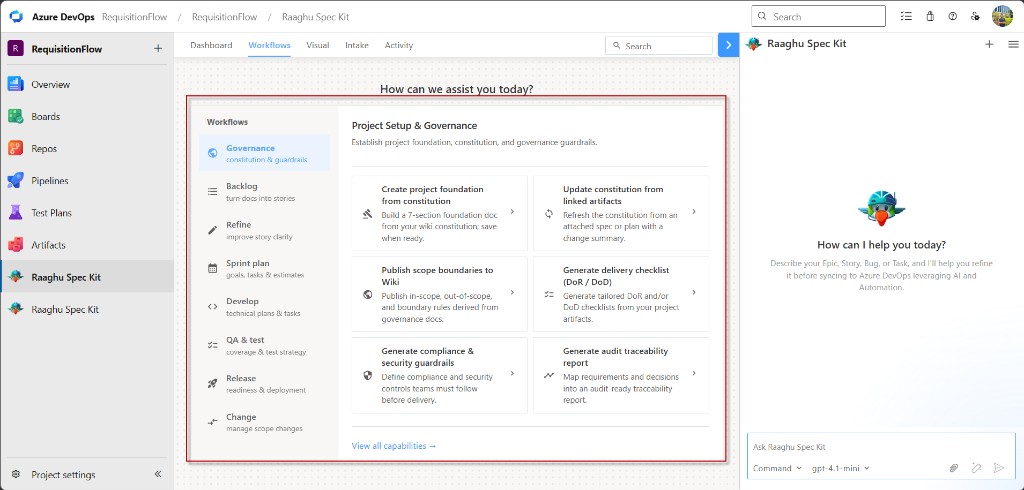
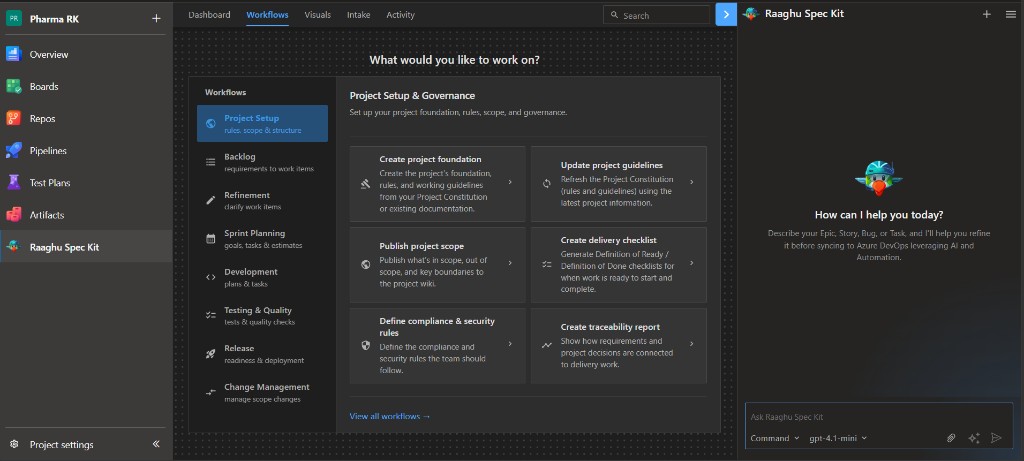
The Workflows tab is a guided menu of ready-made actions. Pick a phase on the left, click a card, and answer a few questions in chat. Spec Kit then creates a wiki page, Azure Boards items, or a report.
You do not need to remember slash commands. Prefer this path if you are new or non-technical.
Start here (day one)
For a new project, these cards are enough to get moving:
- Create a constitution with Spec Kit Commands (
Create Constitution//speckit.constitution) — once per project. - Governance → Create project foundation — builds the project foundation from that constitution.
- Backlog — turn documents into epics, features, or stories (or use Intake for BRD/PRD uploads).
- Open Visuals to sync Boards items level by level when you are ready.
The tables below list every card by phase. You do not need all of them on day one.
Before you start
- Initialize Spec Kit for the project.
- Make sure AI is connected. Organization admins and Project Administrators use Settings. If you do not see Settings, ask an admin.
- For most Governance actions, create a constitution first with Spec Kit Commands (
Create Constitution//speckit.constitution).
How to run a command
- Open Workflows.
- Choose a phase (for example Governance).
- Click a command card.
- Answer the chat questions, then review and save.
Use View all capabilities → to see every command at once, or ← Back to current phase to return to one phase.
Governance
Sets the project ground rules: scope, quality checks, security, and audit trails.
| Command | Purpose |
|---|---|
| Create project foundation | Builds a seven-section foundation doc from your wiki constitution. Use after the constitution exists. Needs a real constitution (not the empty starter). |
| Update project guidelines | Refreshes the Project Constitution from linked artifacts or the latest project information, with a short change summary. Attach a file first when updating from docs. |
| Publish project scope | Publishes what is in scope, out of scope, and boundary rules to the wiki. Best after the foundation doc exists. |
| Create delivery checklist | Creates “ready to start” (Definition of Ready / DoR) and/or “ready to finish” (Definition of Done / DoD) checklists. Used later by sprint readiness checks. |
| Define compliance & security rules | Writes security and compliance rules the team must follow before delivery. |
| Create traceability report | Maps requirements and decisions into an audit-ready report. Fuller if foundation, guardrails, and checklist already exist. |
Typical flow: Create Constitution → Create project foundation → other Governance cards as needed.
Backlog
Turns documents into Azure Boards work: epics, features, and stories.
| Command | Purpose |
|---|---|
| Generate epics from linked artifacts | Suggests top-level epics from wiki specs or stories, then can create them in Boards. |
| Split epics into features | Breaks large epics into child features with scope and acceptance notes. |
| Generate stories from selected feature | Creates user stories under a feature you choose. |
| Generate stories from linked artifacts | Turns BRD/PRD or wiki docs directly into stories, without splitting epics by hand. |
| Generate intake summary from BRD/PRD | Summarizes intake docs into scope, risks, and open questions. |
| Link artifacts to selected work item | Links wiki or spec paths to a Boards item for traceability. |
Refine
Improves existing stories before the team commits to them.
| Command | Purpose |
|---|---|
| Refine selected stories | Improves description and acceptance criteria; can write the better text back to Boards. |
| Standardize acceptance criteria | Rewrites criteria into one consistent format (for example Given/When/Then or bullets). |
| Detect missing requirements | Finds gaps such as edge cases, integrations, or non-functional needs. |
| Attach NFRs to stories | Maps non-functional requirements (NFRs) — such as performance, security, and accessibility — onto related stories. |
| Detect duplicates or overlaps | Reports similar stories. Does not change Boards by itself. |
| Highlight unclear or risky stories | Scores clarity and risk so you can fix the weak ones first. |
Sprint plan
Helps you prepare for a sprint: goals, tasks, estimates, and readiness.
| Command | Purpose |
|---|---|
| Generate sprint goal from selected items | Drafts a short sprint goal from the iteration or selected work items. |
| Generate dev tasks from selected stories | Creates implementation tasks under selected stories. |
| Estimate tasks from plan | Suggests effort for tasks based on a technical plan. |
| Identify cross-team dependencies | Lists dependencies on other teams or systems for the sprint. |
| Run readiness check (DoR validation) | Checks items against your DoR checklist and can save a report. Best after Create delivery checklist. |
Develop
Supports the team while work is being built.
| Command | Purpose |
|---|---|
| Generate technical plan for selected feature | Creates an implementation plan and can save it to the wiki. |
| Refine tasks into implementation steps | Expands Board tasks into ordered steps for developers. |
| Generate test cases from selected stories | Builds test cases from acceptance criteria for QA. |
| Convert bug to linked dev task | Turns a bug into linked fix tasks in Boards. |
| Track work items status from implementation progress | Suggests status updates for child items as work progresses. |
QA & test
Strengthens testing and acceptance before release.
| Command | Purpose |
|---|---|
| Generate test strategy for selected epic | Defines test scope, levels, environments, and risks for an epic. |
| Generate negative / edge test cases | Adds failure-path and edge-case scenarios beyond the happy path. |
| Generate test data matrix | Lists useful input, role, and state combinations for testing. |
| Validate acceptance criteria completeness | Flags unclear, missing, or hard-to-test acceptance criteria. |
| Generate UAT checklist | Builds a stakeholder walkthrough checklist for user acceptance. |
Release
Prepares deployment, gates, and release notes.
| Command | Purpose |
|---|---|
| Generate CI pipeline checklist from constitution | Drafts CI/CD checks aligned to your constitution. Needs a filled-in constitution. |
| Generate release gates from compliance rules | Defines “must pass before release” gates from compliance rules. |
| Generate runbooks (deploy / rollback) | Writes step-by-step deploy and rollback instructions. |
| Generate release notes from completed work items | Summarizes finished Boards work into release notes. |
| Publish release notes to Wiki | Publishes formatted release notes to the project wiki. |
Change
Manages scope changes after the baseline is set.
| Command | Purpose |
|---|---|
| Detect scope drift from latest artifacts | Compares latest specs to agreed scope and flags drift. |
| Highlight changes since last PRD version | Shows what changed between PRD versions. |
| Draft change request with impact analysis | Drafts a change request with scope, timeline, and impact. |
| Mark items requiring approval | Flags backlog items that need formal approval before work starts. |
| Generate stakeholder approval checklist | Creates a sign-off checklist with roles and evidence links. |
Tips
- Start with Governance, then Backlog → Refine → Sprint plan.
- If a command asks for a document you do not have yet, create it with another Workflow card, Intake, or Spec Kit Commands.
- You can Stop generating and Retry in chat when needed. See Chat Panel.