Workflows
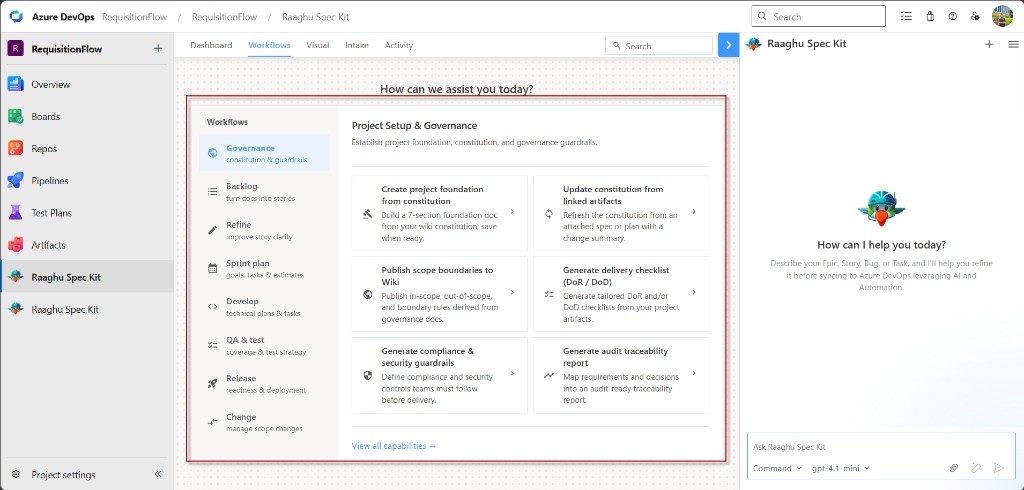
The Workflows tab is a guided menu of ready-made actions. Pick a phase on the left, click a card, and answer a few questions in chat. Spec Kit then creates a wiki page, Azure Boards items, or a report.
You do not need to remember slash commands.
Before you start
- Initialize Spec Kit for the project.
- Connect an AI provider in Settings.
- For most Governance actions, create a constitution first with Spec Kit Commands (
Create Constitution//speckit.constitution).
How to run a command
- Open Workflows.
- Choose a phase (for example Governance).
- Click a command card.
- Answer the chat questions, then review and save.
Use View all capabilities → to see every command at once, or ← Back to current phase to return to one phase.
Governance
Sets the project ground rules: scope, quality checks, security, and audit trails.
| Command | Purpose |
|---|---|
| Create project foundation from constitution | Builds a seven-section foundation doc from your wiki constitution. Use after the constitution exists. Needs a real constitution (not the empty starter). |
| Update constitution from linked artifacts | Refreshes the constitution from an attached spec or plan, with a short change summary. Attach a file first. |
| Publish scope boundaries to Wiki | Publishes what is in scope, out of scope, and boundary rules. Best after the foundation doc exists. |
| Generate delivery checklist (DoR / DoD) | Creates “ready to start” (DoR) and/or “ready to finish” (DoD) checklists. Used later by sprint readiness checks. |
| Generate compliance & security guardrails | Writes security and compliance rules the team must follow before delivery. |
| Generate audit traceability report | Maps requirements and decisions into an audit-ready report. Fuller if foundation, guardrails, and checklist already exist. |
Typical flow: Create Constitution → Create project foundation → other Governance cards as needed.
Backlog
Turns documents into Azure Boards work: epics, features, and stories.
| Command | Purpose |
|---|---|
| Generate epics from linked artifacts | Suggests top-level epics from wiki specs or stories, then can create them in Boards. |
| Split epics into features | Breaks large epics into child features with scope and acceptance notes. |
| Generate stories from selected feature | Creates user stories under a feature you choose. |
| Generate stories from linked artifacts | Turns BRD/PRD or wiki docs directly into stories, without splitting epics by hand. |
| Generate intake summary from BRD/PRD | Summarizes intake docs into scope, risks, and open questions. |
| Link artifacts to selected work item | Links wiki or spec paths to a Boards item for traceability. |
Refine
Improves existing stories before the team commits to them.
| Command | Purpose |
|---|---|
| Refine selected stories | Improves description and acceptance criteria; can write the better text back to Boards. |
| Standardize acceptance criteria | Rewrites criteria into one consistent format (for example Given/When/Then or bullets). |
| Detect missing requirements | Finds gaps such as edge cases, integrations, or non-functional needs. |
| Attach NFRs to stories | Maps performance, security, and accessibility expectations onto related stories. |
| Detect duplicates or overlaps | Reports similar stories. Does not change Boards by itself. |
| Highlight unclear or risky stories | Scores clarity and risk so you can fix the weak ones first. |
Sprint plan
Helps you prepare for a sprint: goals, tasks, estimates, and readiness.
| Command | Purpose |
|---|---|
| Generate sprint goal from selected items | Drafts a short sprint goal from the iteration or selected work items. |
| Generate dev tasks from selected stories | Creates implementation tasks under selected stories. |
| Estimate tasks from plan | Suggests effort for tasks based on a technical plan. |
| Identify cross-team dependencies | Lists dependencies on other teams or systems for the sprint. |
| Run readiness check (DoR validation) | Checks items against your DoR checklist and can save a report. Best after Generate delivery checklist. |
Develop
Supports the team while work is being built.
| Command | Purpose |
|---|---|
| Generate technical plan for selected feature | Creates an implementation plan and can save it to the wiki. |
| Refine tasks into implementation steps | Expands Board tasks into ordered steps for developers. |
| Generate test cases from selected stories | Builds test cases from acceptance criteria for QA. |
| Convert bug to linked dev task | Turns a bug into linked fix tasks in Boards. |
| Track work items status from implementation progress | Suggests status updates for child items as work progresses. |
QA & test
Strengthens testing and acceptance before release.
| Command | Purpose |
|---|---|
| Generate test strategy for selected epic | Defines test scope, levels, environments, and risks for an epic. |
| Generate negative / edge test cases | Adds failure-path and edge-case scenarios beyond the happy path. |
| Generate test data matrix | Lists useful input, role, and state combinations for testing. |
| Validate acceptance criteria completeness | Flags unclear, missing, or hard-to-test acceptance criteria. |
| Generate UAT checklist | Builds a stakeholder walkthrough checklist for user acceptance. |
Release
Prepares deployment, gates, and release notes.
| Command | Purpose |
|---|---|
| Generate CI pipeline checklist from constitution | Drafts CI/CD checks aligned to your constitution. Needs a filled-in constitution. |
| Generate release gates from compliance rules | Defines “must pass before release” gates from compliance rules. |
| Generate runbooks (deploy / rollback) | Writes step-by-step deploy and rollback instructions. |
| Generate release notes from completed work items | Summarizes finished Boards work into release notes. |
| Publish release notes to Wiki | Publishes formatted release notes to the project wiki. |
Change
Manages scope changes after the baseline is set.
| Command | Purpose |
|---|---|
| Detect scope drift from latest artifacts | Compares latest specs to agreed scope and flags drift. |
| Highlight changes since last PRD version | Shows what changed between PRD versions. |
| Draft change request with impact analysis | Drafts a change request with scope, timeline, and impact. |
| Mark items requiring approval | Flags backlog items that need formal approval before work starts. |
| Generate stakeholder approval checklist | Creates a sign-off checklist with roles and evidence links. |
Tips
- Start with Governance, then Backlog → Refine → Sprint plan.
- If a command asks for a document you do not have yet, create it with another Workflow card, Intake, or Spec Kit Commands.
- You can Stop generating and Retry in chat when needed. See Chat Panel.